
How this differs from OpenClaw
I call this a lightweight alternative, but it is more honest to say it is a neighboring architecture, not a stripped-down copy.
OpenClaw is an agent that runs all the time on your server, with a messenger as its interface, a scheduler and long-term memory. My setup is event-driven. A routine wakes up on a webhook, does the work and finishes. Nothing is stored between runs except what I keep myself in Jira, the CRM and a table in n8n.
What you get instead of full autonomy:
- no server for the agent (only n8n as an adapter)
- no API keys and no pay-per-token billing, everything stays within the subscription
- the agent works in a sandbox with rights only through connectors, and I leave it drafts only
What you give up: long-term memory, access to the local machine, and the freedom to choose a model. The Routines API is also still experimental and has daily limits. For a routine that starts on an event, that is enough. For heavy use, it is not.
What the routine does after a call
First it gathers context about the person. Then it acts.
Context:
- Gmail: threads with this person from the last 90 days, what was agreed and which language the correspondence uses.
- Telegram: recent messages with them in a personal chat, if there is one, and work chats (in my case also Telegram).
- Google Calendar: past and upcoming events with this person, so it does not create a duplicate call.
- CRM: if the lead is already in the database, its deals and stage, plus notes and open activities.
- Fireflies: earlier meetings with this person or company.
Actions:
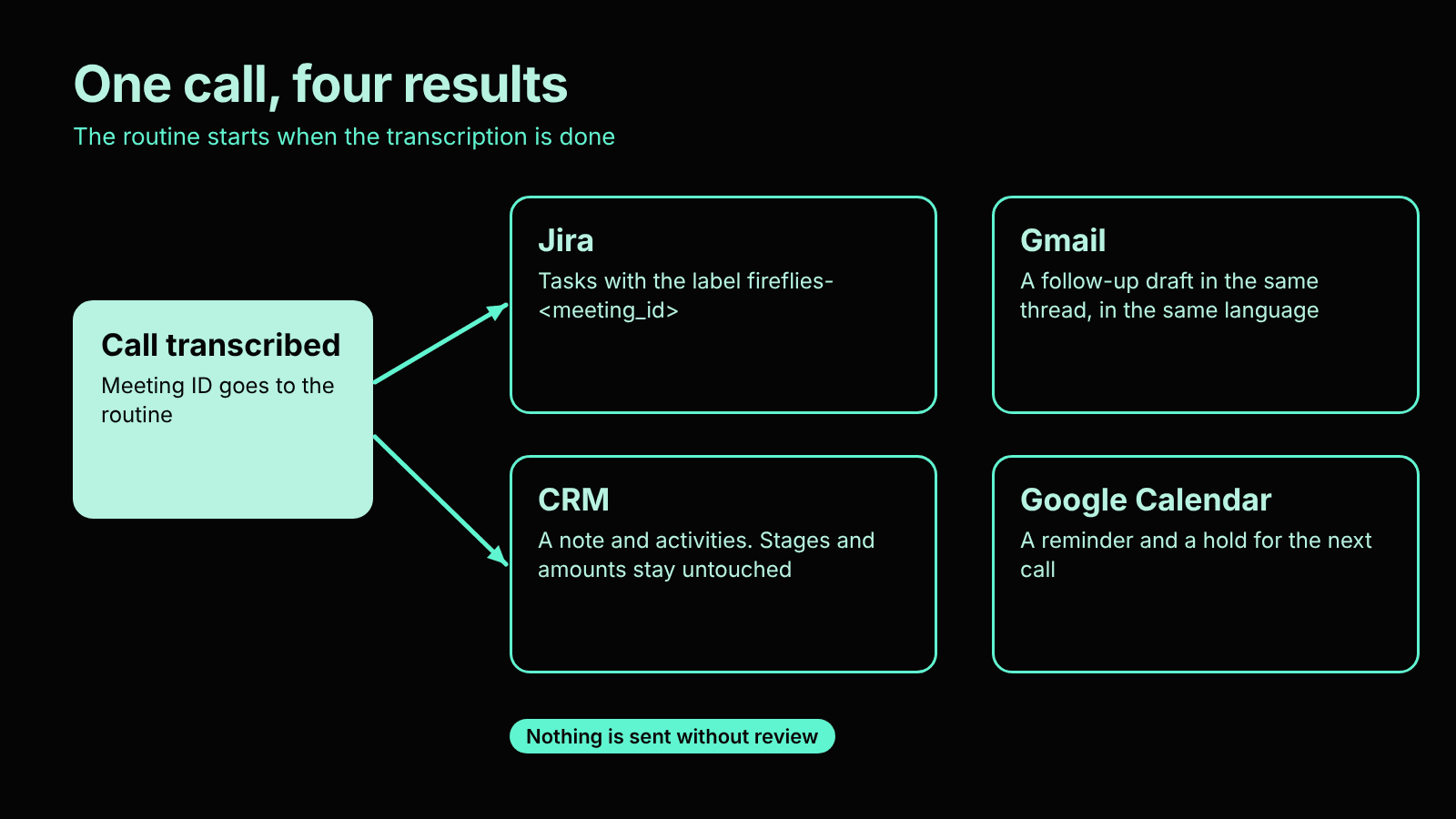
- Creates Jira tasks with the label fireflies-<meeting_id>.
- Writes a follow-up draft in Gmail, in the same thread and in the language of the earlier correspondence.
- Adds a note and activities in the CRM. It does not touch stages or amounts.
- Sets a reminder and a “hold” for the next call in Google Calendar.
- If a document was agreed on during the call, it drafts a proposal or a WBS based on my examples in Drive.
- Sends a short report to Telegram from the bot.
Nothing is sent without me. Everything outgoing is a draft.
Result of one call: Jira tasks, a Gmail draft, a CRM note and a Google Calendar event.
Why Jira when there is a CRM
The CRM is shared and the whole team has access to it. That is right for deals, but not for my personal tasks. So I keep a separate Jira space that only I can see.
Jira works like a database (or instead of one), except with a UI everyone knows. I can always open it, look at the backlog, or add or remove a status by hand.
The free Jira plan allows an unlimited number of tickets. It is a universal place for everything: tasks from client agreements, internal work, reminders. Client tasks land in both Jira and the CRM. The CRM keeps the deal history for the team. Jira holds my own list of actions with deadlines.
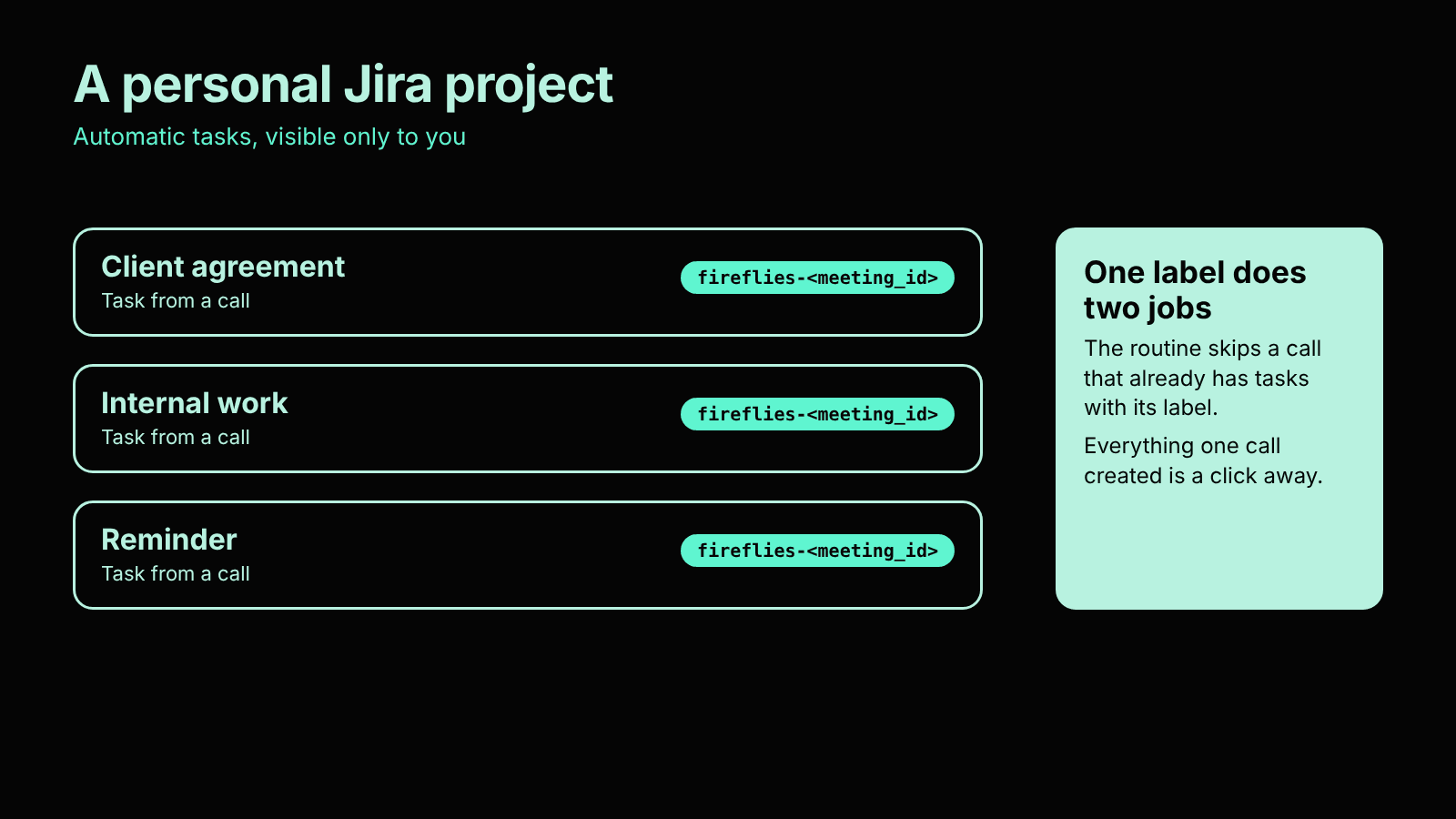
The meeting ID label gives two more things. The routine will not process the same call twice, because before it starts it looks for tasks with that label. And everything one call created can be found in a second.
Personal Jira project: automatically created tasks with the fireflies label and the meeting ID
Why do this if there is an API
A direct API integration means a key and pay-per-token billing. Claude Code Routines run within your subscription plan. A routine has an HTTP trigger with a token, so anyone who can make a POST request can start it.
There is one problem. Most systems do not let you set custom headers and a webhook body, and the routine endpoint requires both. So you need a thin adapter between them. Mine is n8n.
The scheme
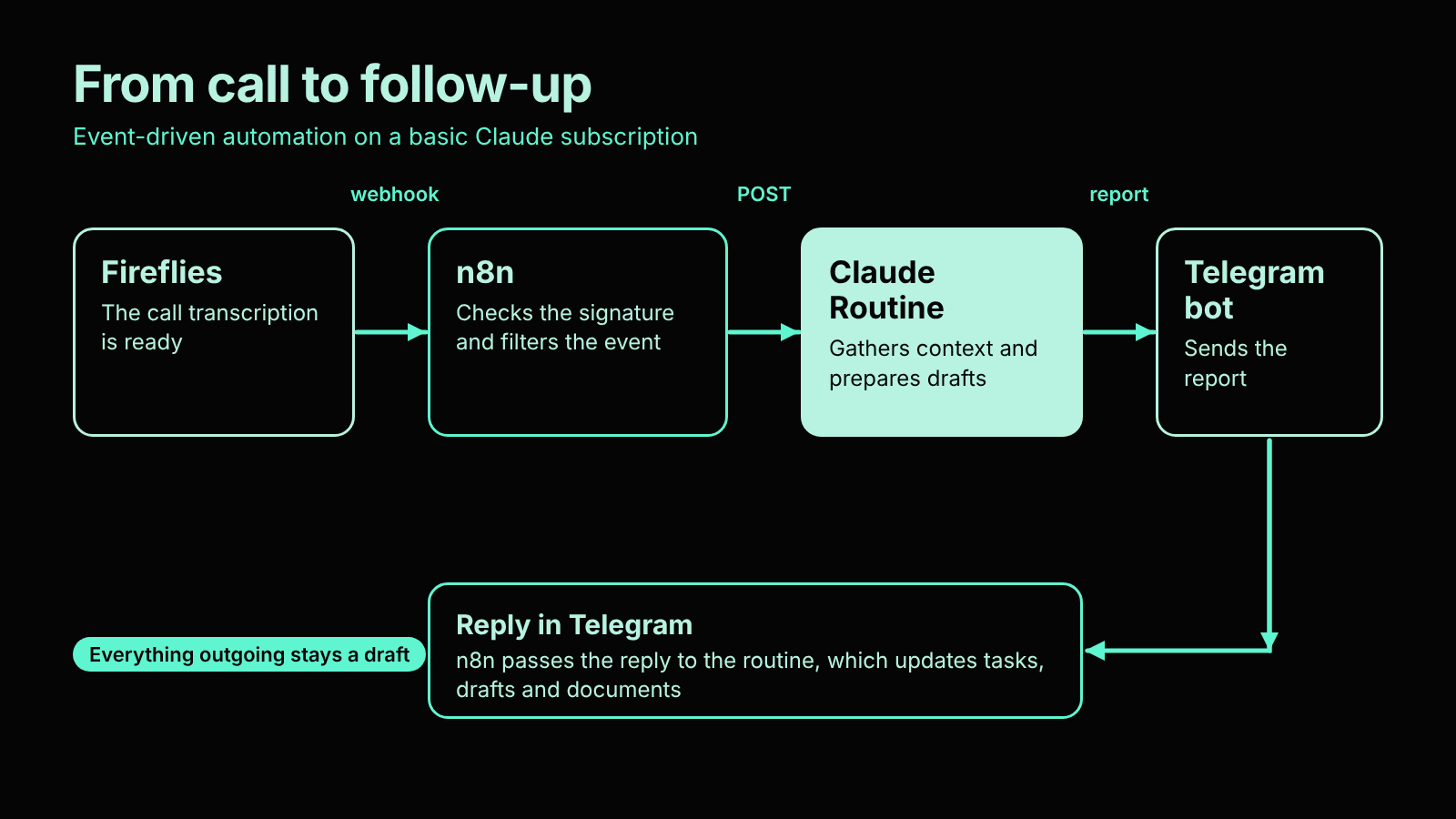
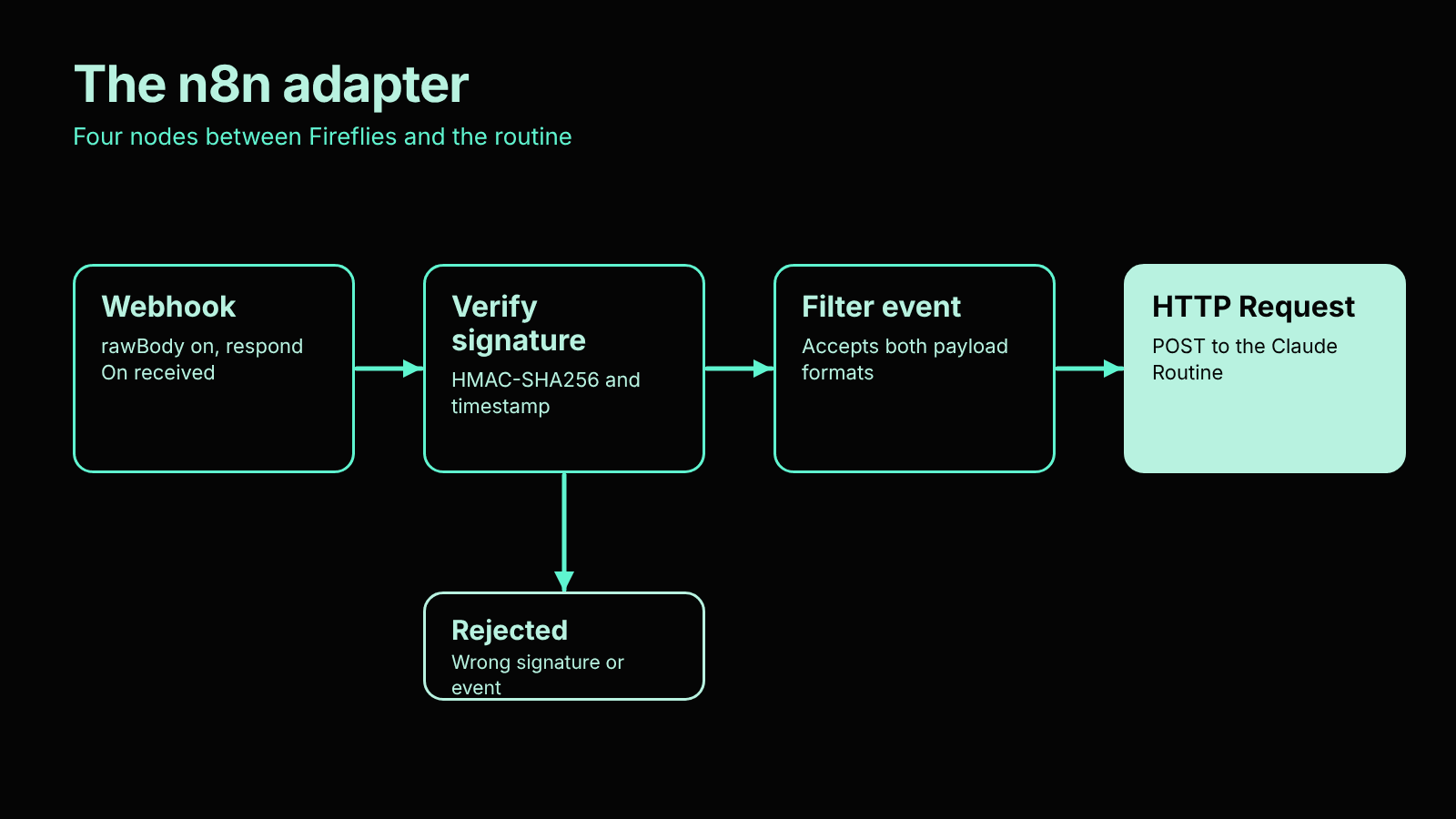
Fireflies → n8n webhook → signature check → event filter → POST to the routine
routine → POST to a second n8n webhook → the bot sends the report to the group
my reply → n8n → routine
Step 1. A routine with an API trigger
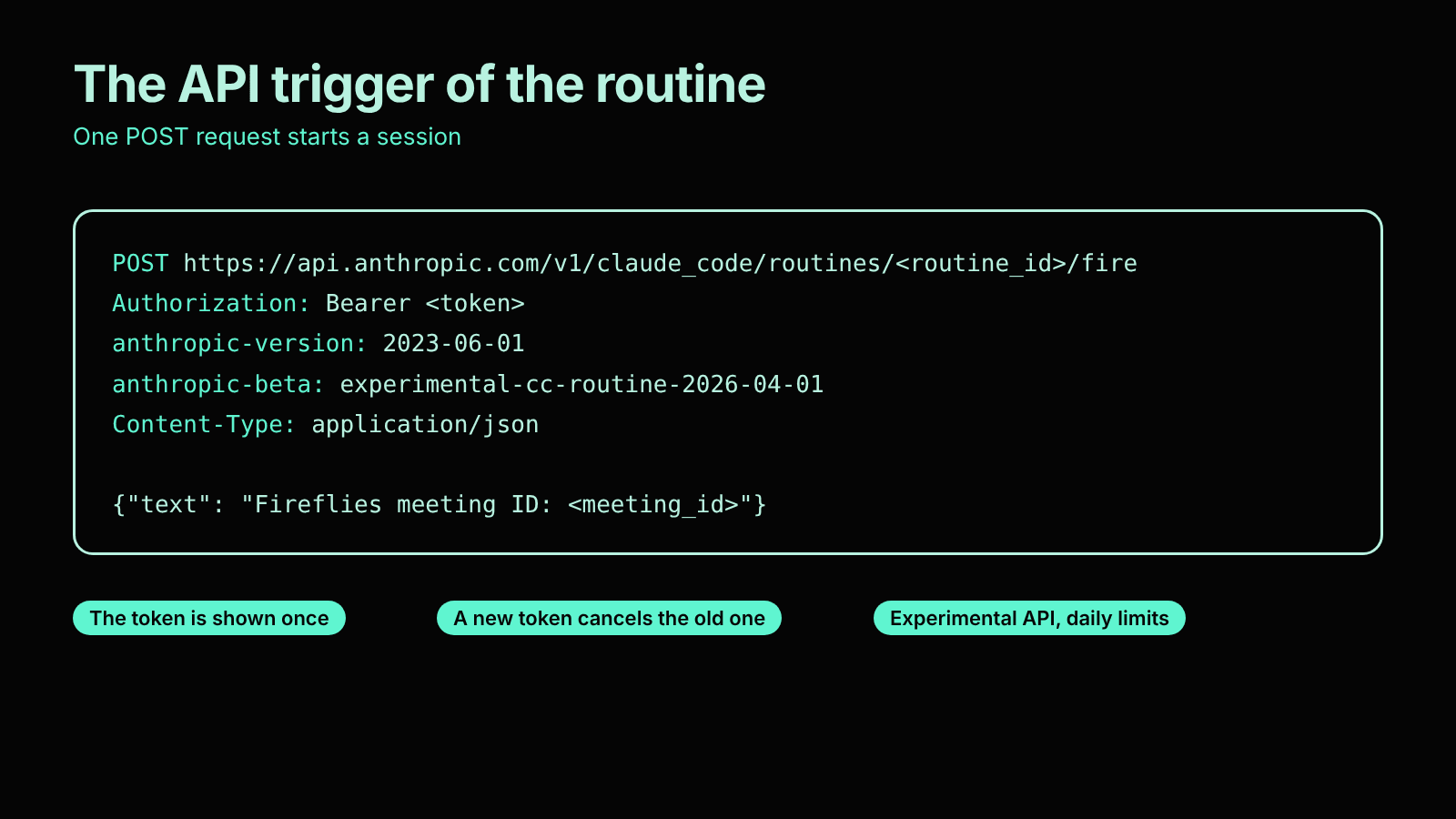
On claude.ai/code/routines you create a routine, write a prompt, add a trigger of the API type and generate a token. The token is shown once. A new token cancels the old one. The request looks like this:
POST https://api.anthropic.com/v1/claude_code/routines/<routine_id>/fire
Authorization: Bearer <token>
anthropic-version: 2023-06-01
anthropic-beta: experimental-cc-routine-2026-04-01
Content-Type: application/json
{“text”: “Fireflies meeting ID: <meeting_id>”}
The text field simply lands in the session as input. So the prompt has to know on its own what to do with the ID. My routine takes the transcript through the Fireflies connector, gathers context about the person from email, Telegram, the calendar and the CRM, and then creates tasks, events, drafts and documents.
For this the routine has connectors for Fireflies, Gmail, Google Calendar, Google Drive, Atlassian (Jira), Pipedrive and Telegram, plus other custom MCP servers (the most interesting one is Garmin 🙃).
Two warnings. The API is still experimental, and the anthropic-beta header may change. There are daily limits on runs.
Every run is a new session. Context between runs has to be passed in the text. That is what Jira and the other intermediate resources are for: they add context between sessions.
Step 2. The webhook in n8n
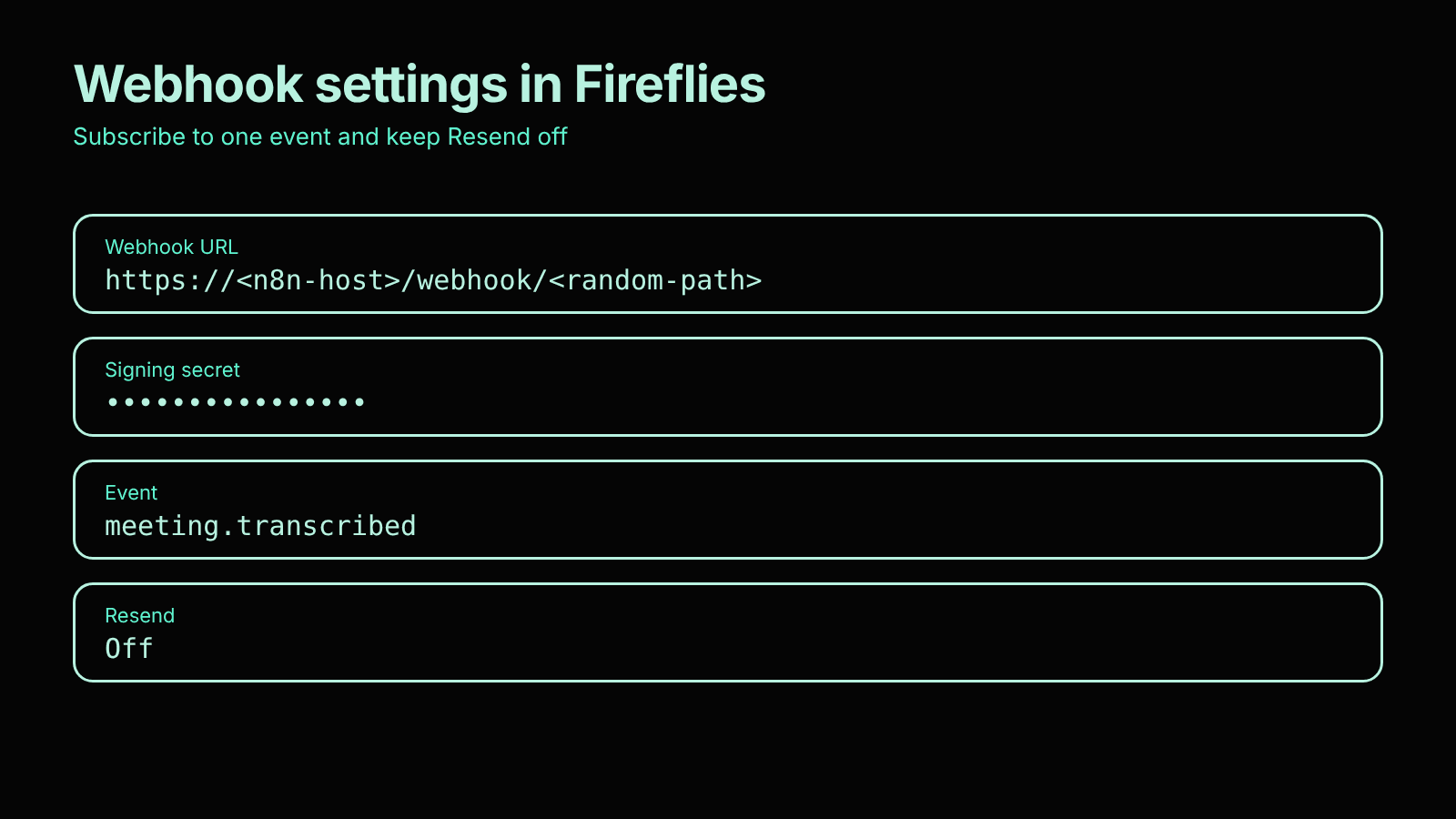
Use a Webhook node, the POST method and a long random path. Turn on rawBody, because you will need it for the signature. Set the response mode to “On received” so Fireflies gets a 200 right away (it has a 30-second timeout).
One thing to watch: if you respond immediately, rejected events are simply lost with no retry. So before you publish, make sure the filter accepts the right format.
Fireflies has two webhook formats:
V1: {meetingId, eventType: “Transcription completed”}
V2: {event: “meeting.transcribed”, timestamp, meeting_id}
At first I built the filter for V1 only, and the real event slipped past it. Now the condition accepts both formats. In the Fireflies settings, subscribe only to meeting.transcribed and keep the “Resend” switch off.
Step 3. The signature
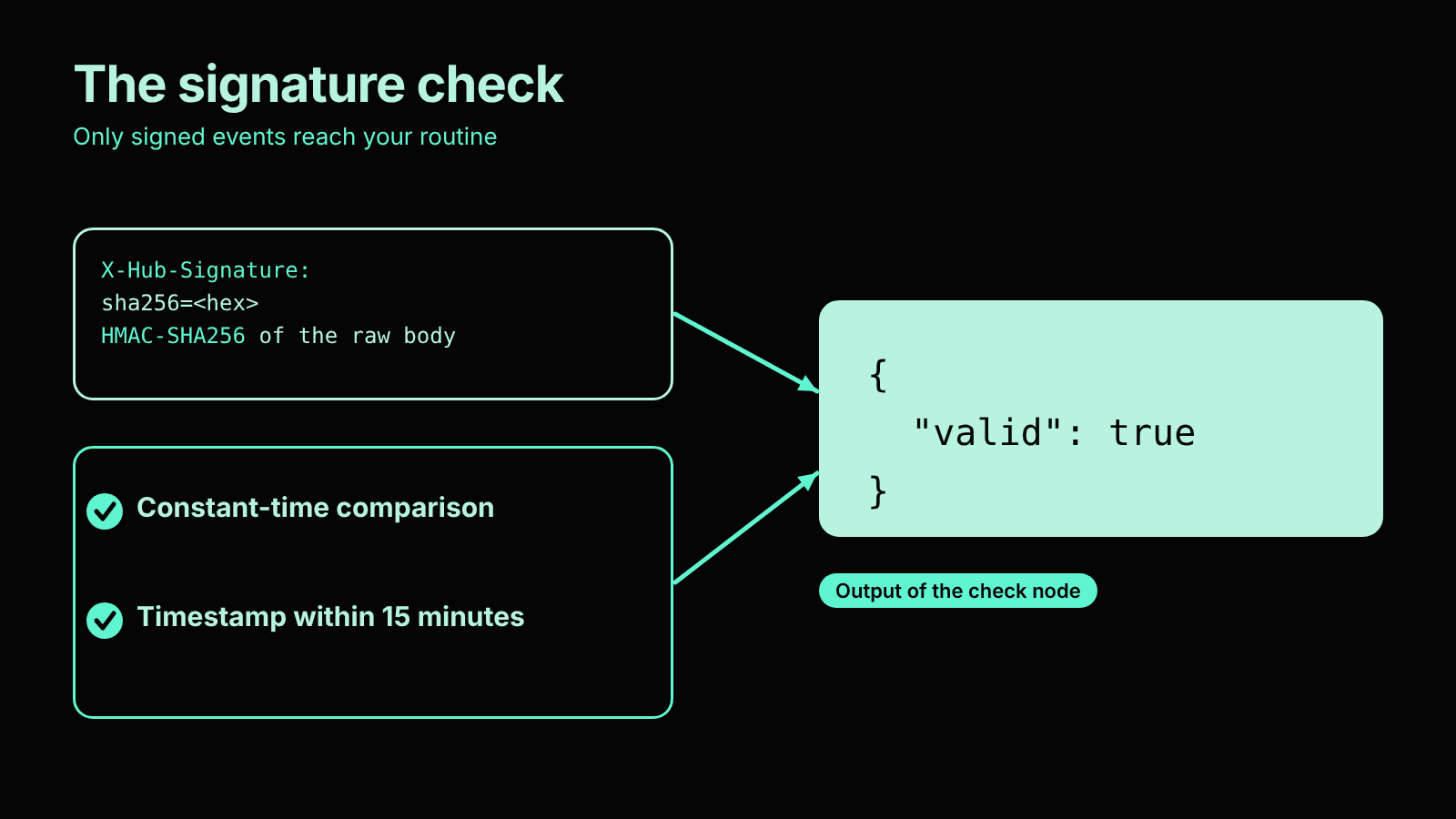
Without a signature, anyone on the internet who knows the URL can start your routine and burn through your limit. Fireflies signs the request body. The header is X-Hub-Signature: sha256=<hex>, where hex is the HMAC-SHA256 of the raw body with your secret. You enter the secret in the Signing Secret field in the webhook settings.
What you need to check:
- comparison in constant time
- freshness of the timestamp. I use a 15-minute window. Retries get a new timestamp, so the window does not break them.
A pitfall: in an n8n Code node, require(‘crypto’) is disallowed (Module ‘crypto’ is disallowed). The options:
- the Crypto node
- the environment variable NODE_FUNCTION_ALLOW_BUILTIN=crypto on the server
- your own SHA-256 and HMAC implementation in plain JS without require
I took the third path, because it does not depend on server settings. I tested it on 13 cases (different body lengths, a long key) and compared it with openssl and node crypto. Everything matched.
A quick manual check (a signed request):
B='{“event”:”meeting.transcribed”,”timestamp”:’$(date +%s)’000,”meeting_id”:”TEST”}’
curl -X POST https://<n8n-host>/webhook/<path> \
-H “Content-Type: application/json” \
-H “X-Hub-Signature: sha256=$(printf ‘%s’ “$B” | openssl dgst -sha256 -hmac ‘<secret>’ | awk ‘{print $NF}’)” \
-d “$B”
A request with a wrong signature should stop at the “Rejected” branch.
Step 4. Calling the routine from n8n
Use an HTTP Request node: a POST to the endpoint from step 1, a Bearer credential, two headers (anthropic-version and anthropic-beta) and this body:
{ “text”: “Fireflies meeting ID: {{ $json.body.meeting_id }}” }
Do not put the token in the node directly. Use a credential.
Step 5. The bot's report and replies
A separate Telegram group with a bot is needed for corrections. After a call, ideas and comments often come to mind that were not in the transcript. Or you decide to delegate a task to a colleague, or outsource it to partners. The fastest way is to write it as text in the group, and the workflow updates everything for the new context: tasks, the email draft, the document.
It works like this:
- The second workflow in n8n has a webhook that receives the report from the routine (protected by a secret header) and sends it to the group through the bot. Every message sent is saved in a Data table: chat_id, message_id, meeting_id, report text.
- The third workflow has a Telegram Trigger. When I Reply to a bot message, n8n finds the meeting in the table by reply_to_message.message_id and starts the routine with this text: the meeting ID, the original report and my reply.
- The routine makes the changes and sends the result through the same webhook. It lands as a reply in the same thread. Examples of replies: “Add Nazar to the email copy,” “Instead of a week, set the deadline to Friday,” “We will give this task to the contractor, create a description and an email draft for them.”
Next: voice messages
I am working on voice messages now, because dictating is faster than typing. Built-in transcription in Telegram is available only with Premium, so it will not suit everyone. For now I simply dictate text with the built-in dictation on the Apple keyboard and send it to the group as a normal reply. Nothing extra needs to be set up for that. I would be glad to get recommendations on how to transcribe audio.
When I implement voice messages, I will update the article.
What to keep in mind
- Everything outgoing stays a draft. Emails are not sent, CRM stages do not change, documents are not shared. I review and correct.
- Every run is a new session with no memory. Context is passed in text and through intermediate resources.
- Connectors that read personal data (email, Telegram, calendar) give the routine access to a lot. Start with narrow rights and clear prohibitions in the prompt.
- Keep secrets in credentials. Do not paste them anywhere public.
- First let the routine work in a “drafts only” mode. Widen the rights only when you trust the result.
- The routine environment must have network access to your n8n.
If you are interested, I can share the workflow structure and the routine prompt. Write in the comments.
Disclaimer
Yes, it is a Frankenstein: several services glued together with webhooks. But this flow helps me stay focused on my tasks and miss nothing, and it already takes a lot of routine off my plate.
This is not a SaaS in the sense everyone is used to. It is my interpretation of what is easy to assemble from ready parts. I am simply sharing research, not selling a finished solution. The experimental API may change, so check the current terms and do not run this on critical processes without testing.
FAQ
What is a lightweight alternative to OpenClaw?
It is an event-driven setup: a Claude Code Routine wakes on a webhook, does the work and finishes. n8n sits between your tools and the routine as a thin adapter. You need no server for an agent, no API keys and no pay-per-token billing, because everything runs inside your Claude subscription. The agent works in a sandbox, and everything it produces stays a draft.
How is an event-driven routine different from OpenClaw?
OpenClaw is an agent that runs all the time on your server, with a messenger as its interface, a scheduler and long-term memory. A routine runs once per event and keeps nothing between runs, except what you store in Jira, a CRM or an n8n table. You give up long-term memory, access to the local machine and the choice of model.
Can you use Claude Code Routines without API tokens?
Yes. Routines run within your subscription plan, and each routine has an HTTP trigger with its own token, so any system that can send a POST request can start it. Two limits apply. The Routines API is still experimental, so the anthropic-beta header may change, and there are daily limits on runs. That is enough for event-based work and not for heavy use.
Why do you need n8n between Fireflies and a Claude Routine?
Most systems cannot set custom headers and a custom body on a webhook, and the routine endpoint requires both. n8n fills that gap. It receives the Fireflies webhook, verifies the signature, filters the event and sends the POST request to the routine. The same adapter works for any trigger that can send a webhook, such as a CRM, a form, a support desk or a deploy pipeline.
How do you secure a webhook that starts an AI routine?
Verify the signature. Fireflies sends X-Hub-Signature, an HMAC-SHA256 of the raw request body made with your secret. Compare it in constant time and accept only fresh timestamps, for example within 15 minutes. Without this check, anyone who knows the URL can start your routine and use up your limit. Keep tokens in n8n credentials and give the connectors narrow rights.
What can a Claude routine automate after a sales call?
It reads the transcript, then gathers context from Gmail, Telegram, Google Calendar, the CRM and earlier Fireflies meetings. It creates Jira tasks with a meeting ID label, writes a follow-up draft in the same email thread and language, adds a CRM note, sets a calendar hold for the next call and drafts a proposal when one was agreed. A short report goes to Telegram. Nothing is sent without review.
What are the limits of this approach?
Every run is a new session with no memory, so context has to travel in the text or through Jira and other resources. The API is experimental and has daily limits. Connectors that read email, chats and calendars give the routine wide access, so start with drafts only and clear prohibitions in the prompt. Test the flow before you use it on critical processes.