
The difference between Kubernetes and OpenShift is that where as in general Kubernetes takes raw infrastructure and runs containers on them, Openshift gives you something that’s enterprise ready ‘Out of the box’ that orchestrate all applications right from the start. Kubernetes is the open-source container orchestration you deploy and tailor to your requirements. Red Hat’s answer to this is OpenShift, their commercially supported distribution of Kubernetes with integrated CI/CD, a stricter policy around security defaults and fine-grained enterprise support.
Containerization is increasingly essential — the app container market will reach an estimated average annual growth of compound annual rate of 33.5% from 2025 to 2030. When it comes to specific technologies, the OpenShift vs Kubernetes debate takes over enterprise planning meetings.
In this article, you’ll find a detailed comparison of Kubernetes vs OpenShift to assist you in making the correct choice with contributions from container orchestration consulting experts.

But in recent days, Kubernetes has received a major blow from other powerful solutions for application containerizing. For many of them, that means looking towards Red Hat OpenShift and away from the various flavours of PaaS. Instead, it is a complete platform that runs on Kubernetes. It’s got enterprise features, and security-focused features.
Although OpenShift has some places where it does better than Kubernetes, the former still lags behind in some other aspects that makes it yet another ineffectual solution for many use cases. Therefore, companies should clearly understand the difference between OpenShift and Kubernetes, as well as their ideal use cases.
This knowledge helps them understand:
- How quickly can teams adopt containers?
- How secure and compliant are their deployments?
- Which level of engineers’ expertise and involvement is required to maintain clusters?
- What are the potential unforeseen challenges that pop up on your journey and could impact the TCO?
Kubernetes in a Nutshell
Let’s start with definitions. Kubernetes is an open source container orchestration engine based on the original design implemented at Google. The key difference between Kubernetes and Docker, a well-known container platform, is that the two utilizes containers at different levels. Docker is more about managing one container, while Kubernetes can manage a clustered-container environment. The platform now functions as a open-source technology that delivers sophisticated technologies for deploying, scaling and managing containerized apps.
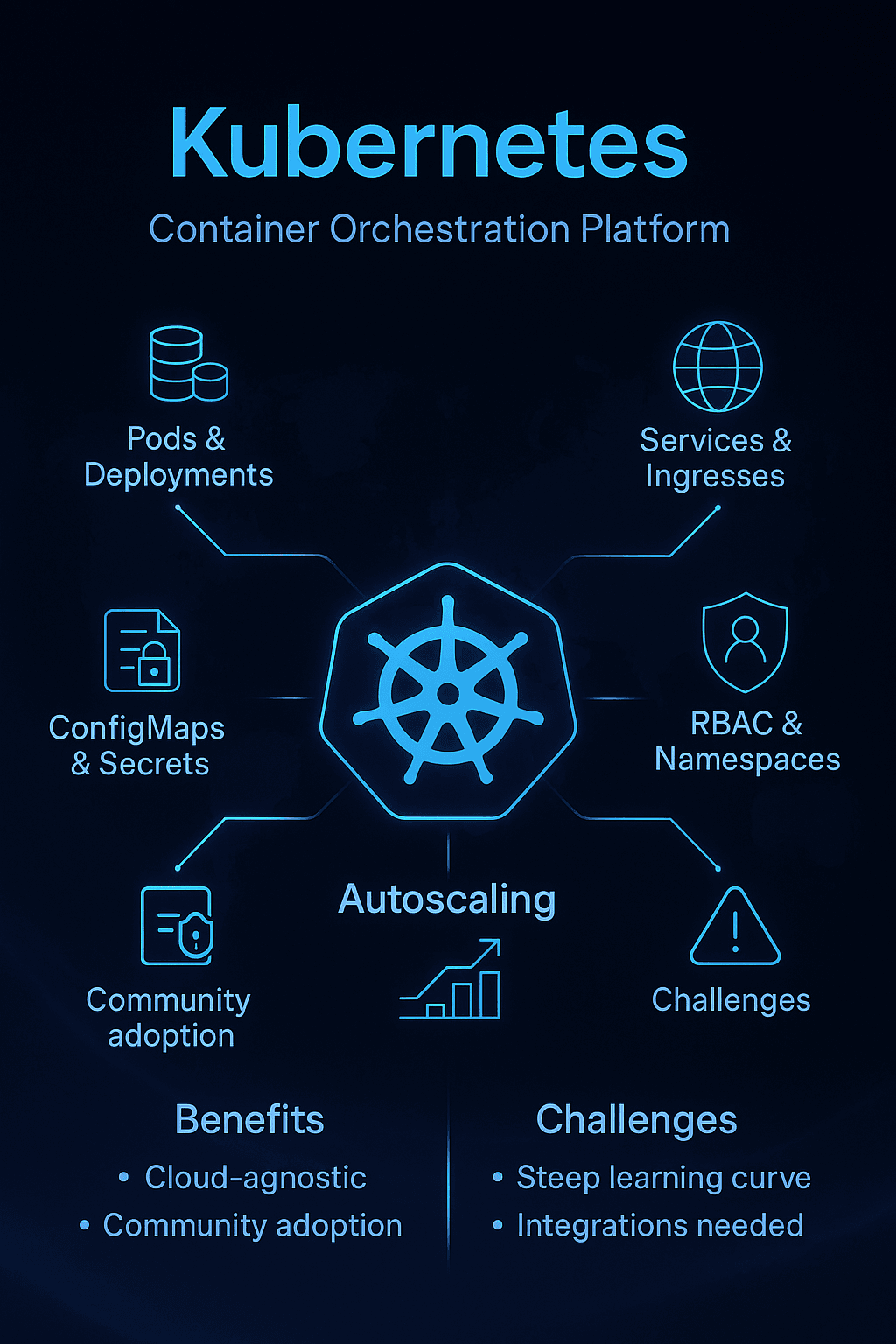
Ecosystem: Kubernetes is now a mature tech so there are updates, patches, integrations, tools (i.e. prometheus) and best practices out there. The important Kubernetes architecture components and features include:
- Pods and deployments are used for running and scaling workloads
- Services and ingress that expose apps inside and outside the cluster
- ConfigMaps and secrets are used for storing configuration and sensitive data
- RBAC and namespaces that help users manage multi-tenancy and security
- Autoscaling is used to scale workloads based on demand.
Kubernetes delivers a range of other significant benefits to businesses, beyond its maturity and extensive set of capabilities. The platform is cloud-agnostic, which ensures excellent flexibility. In addition, huge community adoption ensures vendor-neutral governance of the platform.
Unfortunately, Kubernetes also has some downsides that are not unsolvable but can create additional challenges for businesses that adopt this technology. Indeed, the learning curve is very steep. And we even need those integrations for different workflows (logging, monitoring, CI/CD pipeline management).
Using Kubernetes: strong like bull There is no doubt that Kubernetes is a powerful tool but there are still plenty concerns for businesses especially in terms of the ecosystem around Kubernetes.
OpenShift in a Nutshell
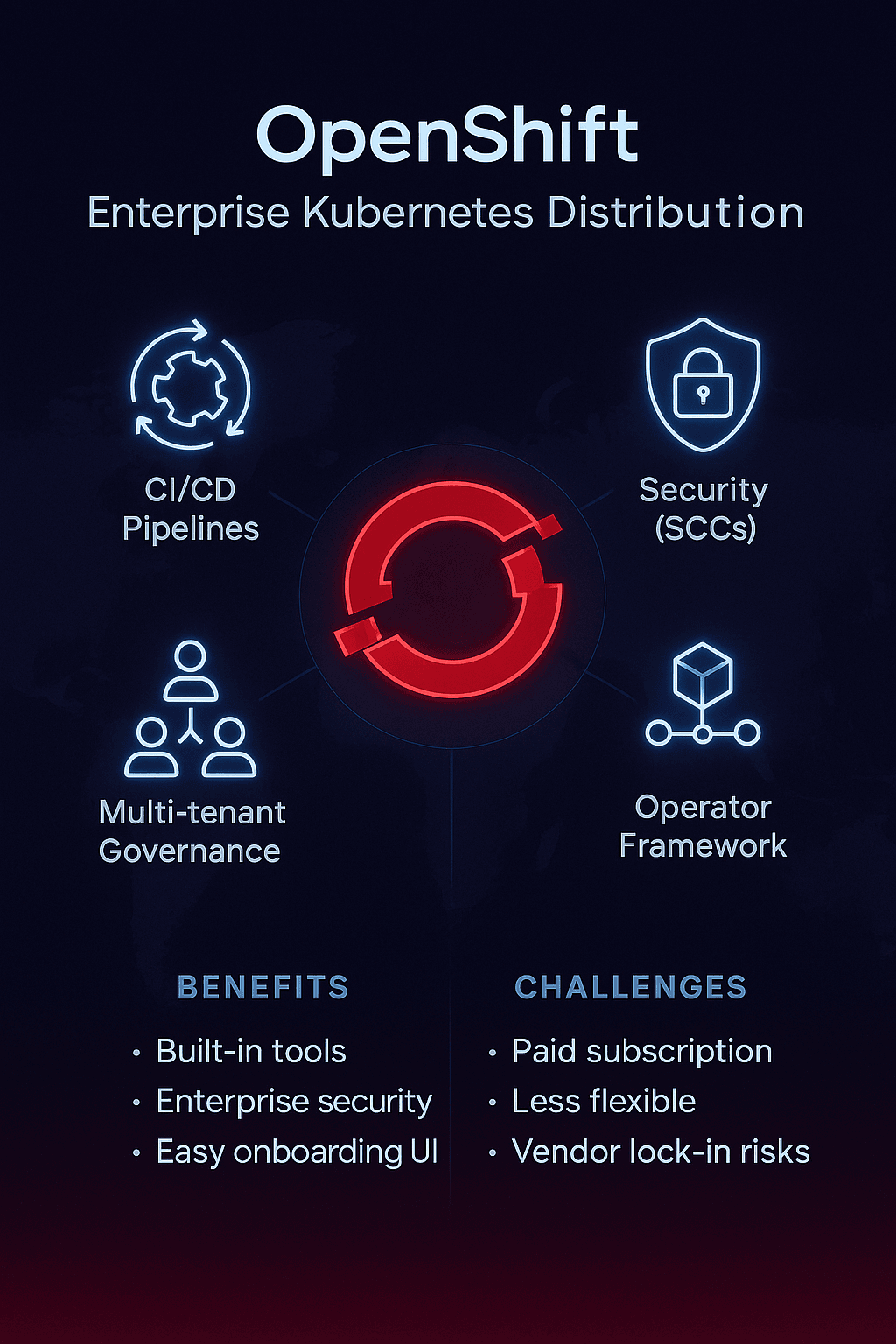
OpenShift, meanwhile is a containerization platform built on Kubernetes. Red Hat has released it to enhance containerization for enterprises. Some more features are also offered right out of the box with OpenShift to meet the requirements of high profile enterprise clients, for instance:
- Integrated CI/CD pipelines and tooling for those pipelines
- Enterprise security features, such as Security Context Constraints (SCCs)
- Multi-tenant policies and governance features that are especially relevant to large organizations
- An operator framework designed for the lifecycle management of applications and services.
As a platform designed for a large number of specialists, OpenShift provides ready-to-use tooling accessible to specialists with varying levels of technical expertise. The intuitive user interface of the solution allows easy onboarding in software engineers. The other interesting thing about the platform is that it has a good emphasis on enterprise-grade compliance and security rules.
On the downside, OpenShift also has its shortcomings. In particular, the platform requires a paid subscription, where large clusters are rather expensive. In addition, some DevOps specialists claim that OpenShift is less flexible than Kubernetes. Minimum is that the platform carries risk of vendor lock-in.
On the whole, OpenShift is a great choice and will suit the enterprises but could lack the agility needed by smaller businesses.
OpenShift vs Kubernetes: Full Table
Without much ado, let’s get down to a head-to-head comparison with Kubernetes and OpenShift. The table below illustrates the key differences between Kubernetes and OpenShift.
Kubernetes vs OpenShift: A Comparison
| Feature | Kubernetes | OpenShift |
|---|---|---|
| Type | Open-source container orchestration platform | Kubernetes distribution / Enterprise PaaS |
| Installation | Flexible but complex; kubeadm, kops, cloud providers | Installer + integrated tooling; easier for enterprises |
| Security Defaults | Minimal; user must configure | Strict by default (SCCs, rootless containers) |
| Multi-Tenancy | Manual setup with namespaces & RBAC | Built-in multi-tenancy and stricter RBAC |
| CI/CD | Requires external tools (Jenkins, ArgoCD, Tekton) | Built-in pipelines and CI/CD integration |
| Web UI | Kubernetes Dashboard (basic) | Polished OpenShift Console (enterprise-grade) |
| Ecosystem | Open, community-driven | Curated Red Hat ecosystem |
| Support | Community, CNCF vendors | Commercial support from Red Hat |
| Cost | Free (but costs for support, engineering, add-ons) | Paid subscription (with support included) |
| Cluster Upgrades | Manual coordination, version skew risks | Automated with cluster version operator |
| Security Policy Model | Pod Security Standards (PSS), manual enforcement | Security Context Constraints (SCCs), enforced by default |
| Ingress vs Routes | Ingress controllers require setup | Routes built-in with HAProxy, automatic TLS |
| Application Lifecycle | Helm, Kustomize, requires integration | Operators + OperatorHub integrated |
| Total Cost of Ownership | Lower upfront, higher operational overhead | Higher subscription, lower operational burden |
Key Differences Explained
Understanding the core distinctions between OpenShift & Kubernetes is critical for selecting the right platform for your infrastructure.
Cluster Upgrades
Upgrades to Kubernetes need to be manually coordinated between control plane components, worker nodes and addons with compatibility risks and a whole lot of testing. This is automated by OpenShift with the help of CVO (Cluster Version Operator) to keep any operation downtimeless. Upgrade paths have always been tested thoroughly by Red Hat making the risk of breaking changes much lesser. Manually, engineers waste considerable time on this, especially when you run a multi-cluster enterprise.
Security Policy Model
The Kubernetes primitive, Pod Security Policy, also needs to be set manually at the namespace level. The default is that anything goes: containers can run as root and touch whatever resources of the host they like. Security is enforced by default from the very first day with OpenShift’s Security Context Constraints. Containers are highly privileged unless otherwise specified. This is consistent with enterprises’ security needs for a default denial model. Understanding these differences between Kubernetes and OpenShift is crucial for security planning.
Ingress vs Routes
The Kubernetes and OpenShift approaches to external traffic differ fundamentally. Kubernetes needs ingress controller installation, configuration and management of TLS termination along with manual certificate handling. OpenShift routes are integrated with the platform using HAProxy, and include features such as automatic TLS certificate issuance, support for blue-green deployments, and validation of canary-release process.
Application Lifecycle Management
Kubernetes typically involves Helm for packaging, Kustomize for configuration, and custom scripts for deployments. Red Hat OpenShift’s integrated platform leverages Operators and OperatorHub for lifecycle management. Operators also automate deployment, scaling, backup, and updating of services cutting out a large amount of operational overhead.
Total Cost of Ownership
There are high overheads in Kubernetes in terms of engineering time, third-party support contracts, monitoring solutions, security add-ons and DR options you name it. Red Hat support, automated lifecycle management, integrated capacity as required—by consuming it to analyze workloads and the size of developer groups. tools and updates are part of OpenShift’s subscription. Though initial subscription fees are higher, overall costs are often lower once reduced engineering overhead is taken into account.
How to Decide: 10-Question Checklist
Choosing between Kubernetes or OpenShift isn’t about which platform is objectively better — it’s about which fits your specific situation.
1. Do you have an experienced Kubernetes/DevOps team?
Yes → Kubernetes gives flexibility. No → OpenShift reduces expertise required.
2. How important is time-to-production?
Fast → OpenShift accelerates deployment. Have time → Kubernetes allows customization.
3. What’s your security and compliance posture?
Strict compliance (finance, healthcare) → OpenShift’s security-by-default simplifies compliance. Standard needs → Kubernetes can be configured with more effort.
4. Are you cloud-native or migrating legacy apps?
Cloud-native greenfield → Either works. Legacy migration → OpenShift’s integrated tools ease transition.
5. What’s your budget reality?
Budget-constrained → Kubernetes has lower upfront costs. Budget available → OpenShift includes support and reduces risk.
6. How many clusters will you manage?
Single cluster → Kubernetes manual management is feasible. Multi-cluster → OpenShift automation becomes valuable.
7. Do you need vendor support?
Critical production requiring 24/7 support → OpenShift includes enterprise support. Community sufficient → Kubernetes has extensive resources.
8. How important is ecosystem flexibility?
Want tool choice freedom → Kubernetes provides maximum flexibility. Prefer curated integrations → OpenShift reduces complexity.
9. What’s your upgrade approach?
Have automation processes → Kubernetes gives control. Want automated lifecycle → OpenShift handles upgrades automatically.
10. Are you invested in the Red Hat ecosystem?
Using RHEL or Red Hat middleware → OpenShift integrates naturally. No Red Hat presence → Kubernetes offers vendor neutrality.
Both platforms power successful enterprise strategies. Many teams find value in exploring this community discussion on managed options to understand real-world perspectives.
How to Decide: Which One Fits Your Enterprise?
When evaluating Kubernetes or OpenShift, focus on your organization’s budget, security requirements, team expertise, and operational priorities rather than seeking a universal answer. Also, while choosing between Kubernetes and OpenShift, it is important to consider several factors. From our experience, focus on the following:
- Budget. Kubernetes might be a more cost-efficient option than OpenShift, at least due to lower upfront costs.
- Security and compliance. OpenShift provides more advanced security measures out of the box, but Kubernetes leaves more space for customization.
- Developer productivity. Kubernetes is harder to manage and has a steeper learning curve compared to OpenShift.
- Ecosystem strategy. Here is a critical difference between Kubernetes and OpenShift. Kubernetes offers greater flexibility in choosing supporting tools. Meanwhile, OpenShift is more tied to the Red Hat ecosystem.
- Support. While working with Kubernetes, you should seek support from the community and third-party vendors, whereas OpenShift provides Red Hat enterprise support.
In sum, both options have their ideal use cases. We suggest using Kubernetes if you are running a cloud-native startup. This approach will also work in cases where you have a strong DevOps team that can handle complex configuration and is open to experimentation.
Meanwhile, if you are more focused on common enterprise concerns such as compliance and governance, choose OpenShift. This platform provides speed, security, and confidence.
Examples of Successful Enterprise-Level Containerization
We at AppRecode have significant experience in implementing containerization for enterprises. In particular, our specialists applied Kubernetes to design and implement a flexible on-premises delivery platform for a global telecom company. As long as the customer required custom tooling for monitoring and observability, our specialists designed a highly efficient observability stack for the delivery platform.
Our hands-on experience implementing both OpenShift & Kubernetes across enterprise clients demonstrates that both platforms deliver results when paired with experienced DevOps teams.
Read also: Design and implement CI/CD and infrastructure for Communication Gateway
We also helped a leading provider of customer experience software migrate from EC2 instances to a container-based microservices architecture designed with Kubernetes. The platform’s flexibility allowed us to manage the migration without disrupting the customer’s existing services. We also configured enterprise-level security policies with custom rules.
Read also: DevOps Infrastructure Migration
Overall, both cases illustrate that a flexible approach and a team of experienced DevOps specialists can help you implement custom security and control patterns with Kubernetes. While OpenShift might be a more accessible solution with advanced features out of the box, experienced teams like AppRecode are more focused on demonstrating skill and creativity. You can learn more about our expertise on our Clutch page. That’s why we prefer delivering tailored pipelines and infrastructures built with Kubernetes.
“When choosing between Red Hat’s OpenShift and Kubernetes, you should clearly define what is your top priority. If you need flexibility and have an ingenious team willing to experiment with architectural patterns, Kubernetes is a preferred solution. However, if you go with a more conservative enterprise approach where security and control are top priorities, OpenShift might be a better choice.”
Volodymyr Shynkar, Founder at AppRecode
Final Thoughts
Overall, both Kubernetes and OpenShift are strong contenders for app containerization. Many enterprises may find the latter a preferred choice because OpenShift is better suited to enterprise-level security and monitoring policies. However, Kubernetes is a more cost-efficient and flexible solution that truly shines when handled by experienced DevOps engineers.
Therefore, your choice of platform should depend on your priorities. If you focus on control and security out of the box, choose OpenShift. And if you want something more tailored and flexible, custom containerization with Kubernetes might be a better choice.
Regardless of the option you select, it is important to rely on experienced DevOps engineers. AppRecode is ready to provide you with such specialists, as well as a Kubernetes consultant. Contact us and let’s help your enterprise achieve software excellence.
FAQ
What is the difference between Kubernetes and OpenShift?
Kubernetes is an open source container orchestration that runs and schedules containerised applications. OpenShift is Red Hat’s Kubernetes distribution that builds in developer tools, tighter security defaults, admin and control over usage of your resources, automatic operations and commercial support. The bottom line of OpenShift and Kubernetes lies in assembly required. Kubernetes gives powerful building blocks requiring tool integration.
OpenShift vs managed Kubernetes (EKS/AKS/GKE): which is better for enterprises?
That will be based on cloud strategy and the back end of choice. Managed Kubernetes services will also integrate extremely well with their cloud platforms — native IAM, networking, storage and monitoring. They work well if you completely buy into a single cloud provider. OpenShift has cloud and on-premises uniformity that will be important in hybrid and multi-cloud schemes.
Does OpenShift create vendor lock-in? What exactly causes it?
Yes, OpenShift creates some vendor lock-in. OpenShift Routes are platform-specific—migrating to Kubernetes means rewriting ingress configurations. Operators built for OpenShift may not work elsewhere without modification. The shared developer experience relies on OpenShift specific patterns which do not map one-to-one. However, OpenShift is built on top of Kubernetes, so regular resources function the same way.
Which is more secure by default: OpenShift or Kubernetes?
By default OpenShift is way more secure. OpenShift itself imposes Security Context Constraints (SCC) by default which bind containers to not run as the root user, disallow host/network access and limit privilege escalation. The platform features out-of-the-box container image scanning, security advisories and automated patching. Kubernetes offers security features, but it doesn’t enable them by default.
What costs more in real life: OpenShift subscription or "free" Kubernetes?
The cost as a whole is based on the operating method and operation scale. OpenShift subscriptions cost $10,000-50,000+ per year depending on the size of your cluster and level of support and includes platform support with automated lifecycle management, integrated deployment and scaling tooling, as well as security updates. ‘Free’ Kubernetes comes with a price tag that usually exceeds OpenShift subscriptions. Engineers typically spend 2-4 FTEs ($200,000-$400,000/year) managing clusters. Third-party support contracts, monitoring providers, security tools and backup software add another $20,000-$100,000 per year.